Google Analytics 4 launched its “AI Assistant” channel in May. I’ve since accumulated data before covering the feature here.
AI Assistant measures and analyzes traffic from generative AI platforms. In its “Analytics Help” portal, Google states the feature includes traffic from “chatbots like ChatGPT, Gemini, and Claude.”
Google does not include AI Overviews and AI Mode in the channel; instead, it reports those clicks as Organic Search.
To find AI-assisted traffic, go to Reports > Acquisition > Traffic acquisition, then look at the “AI Assistant” Session Channel Group dimension.
This report shows AI-driven traffic performance metrics, including engagement, events per session, time per session, and more.
The new “AI Assistant” feature in Google Analytics measures and analyzes traffic from generative AI platforms. Click image to enlarge.
Landing Pages
The new AI Assistant channel also helps identify pages cited in AI answers that drive clicks. Go to Reports > Engagement > Pages and screens for your site’s highest-traffic pages. Click “Add filter” at the top of the graph.
Then choose:
- “Session default channel group” as the Dimension.
- “Exactly matches” as the Match Type.
- “AI Assistant” as the Value.
Apply the filter to see pages with the most clicks from AI platforms.
AI vs. Other Traffic
You can also compare AI-assisted traffic to other sources. In the same “Pages and screens” section, click the “Add comparison” button on top of the graph. Select “Create new” and choose the same steps as the filter above:
- “Session default channel group” as the Dimension.
- “Exactly matches” as the Match Type.
- “AI Assistant” as the Value.
The report will now compare your AI-assisted traffic with the site’s overall traffic, page by page. To compare with a specific source (e.g., organic traffic), create a new comparison, following the steps above, and remove “All users” from the comparison.
Now you can compare engagement metrics for each page across the two traffic sources: AI-assisted and organic.
In my tests, traffic from the top organic search and AI-assisted pages does not overlap. It’s worth checking the top pages in Semrush or a similar tool to find the prompts driving those AI citations.
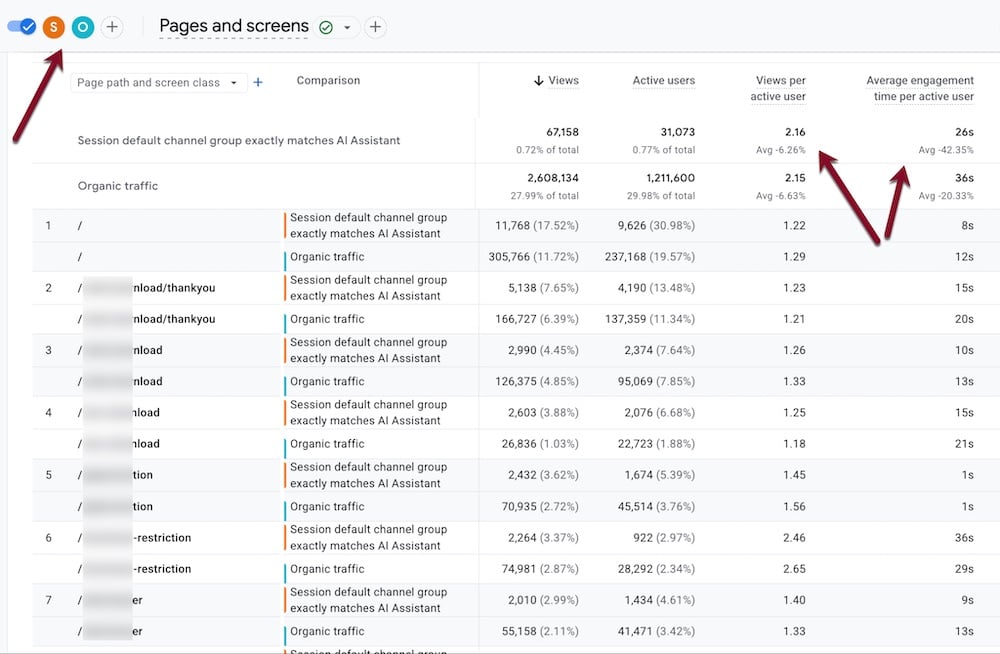
The new feature also enables comparison of AI-assisted traffic performance with other sources. Click image to enlarge.
Using Regex
The AI Assistant default channel makes filtering and comparing easier, but it doesn’t reveal which platforms it includes. Alternatively, you can track individual traffic sources, such as ChatGPT, using regular expressions.
- Go to Reports > Acquisition > Traffic acquisition.
- Click “Add filter” above the chart.
- Select “Session source/medium” for the Dimension.
- Select “matches regex” for Match Type.
Then paste the following regex into “Value”:
.*chatgpt.com.*|.*perplexity.*|.*edgepilot.*|.*copilot.microsoft.com.*|.*openai.com.*|.*gemini.google.com.*|.*claude.ai.*|.*grok.x.ai.*
You can now see a handy breakdown of all your AI traffic sources. Note that the “Organic” and “(not set)” sources did not appear in the AI Assistant channel above, indicating minor data inconsistencies.
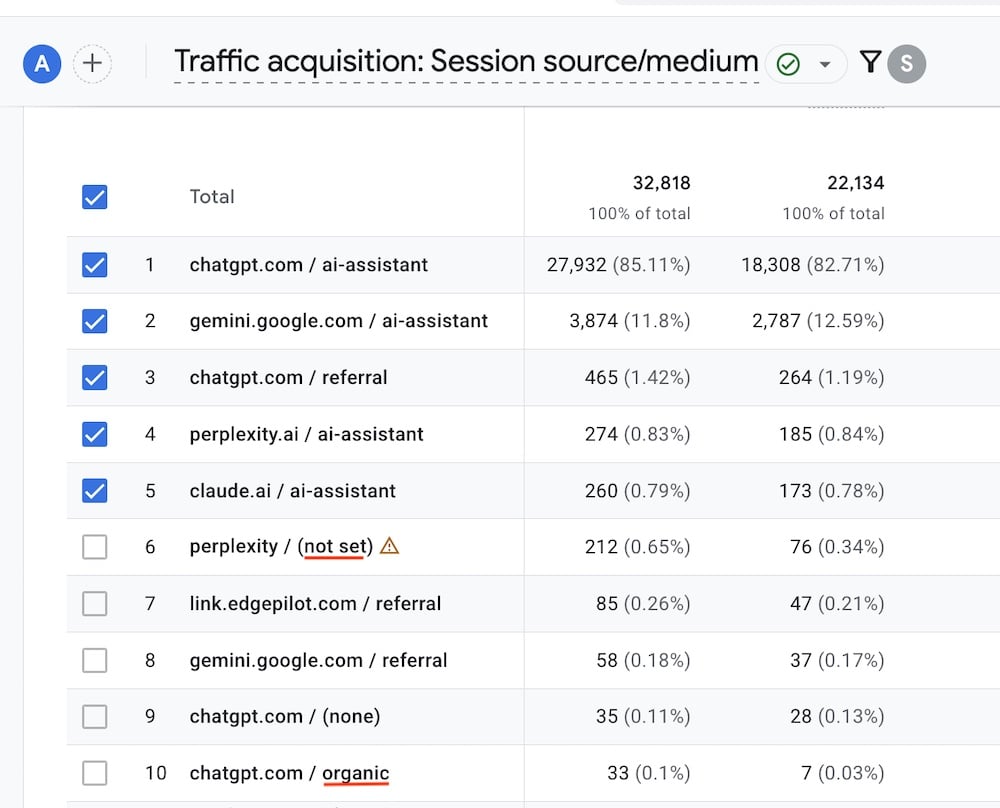
Regular expressions can help reveal which genAI platforms generated traffic. Click image to enlarge.
Smart shopping starts here.
If you enjoyed this article, explore our curated products designed for everyday living.
📱 Download the Dralys App
🛍️ Shop now: www.DralysStore.com