
Unlike traditional search listings, optimizing for visibility in generative AI answers is difficult owing to a lack of native performance reports.
The “Performance” section of Google’s Search Console combines AI Overviews and traditional organic listings, leaving optimizers to guess which channel drove visibility and traffic. ChatGPT shares metrics only with publishers that have licensed content to OpenAI.
Bing is the first platform to offer some transparency. Earlier this year, a few weeks after publishing its “Guide to AEO and GEO,” Bing launched an “AI Performance Report” in Webmaster Tools. It has now improved the report to make it more useful and actionable.
AI Performance
The report tracks citations in Microsoft Copilot, AI-generated summaries in Bing, and select AI partner integrations. Unfortunately, there’s no option to filter by a single channel, and no way to identify the partners.
The report consists of two sections: “Grounding Queries” and “Pages.”
- Grounding Queries are “the key phrases the AI used when retrieving content that was cited in its answer.” In other words, the queries are the fan-out terms of Bing’s AI agents to search for answers, though we don’t know which search engines or platforms they access.
- Pages are the URLs included in the AI answers.
For every Grounding Query, the AI Performance Report now includes:
- Query intent (Navigational, Informational, Learn and Solve, Commercial, Conversational, Comparison, and more).
- Query topic (Education, Self-Help Books, Mindfulness and Medication, and more).
- The average number of unique pages cited per day in AI answers.
- “Citation share,” which is “the percentage of citations attributed to your site out of all citations shown for a specific grounding query.”
Users can sort each column and also export the entire report to a spreadsheet for additional sorting and filtering.
Clicking any Grounding Query will display a list of the user’s pages cited for that word or phrase.
The report includes the frequency of each cited page (URL) — how often it appears — but not the number of views or clicks. Clicking any URL reveals all its Grounding Queries for a given period.
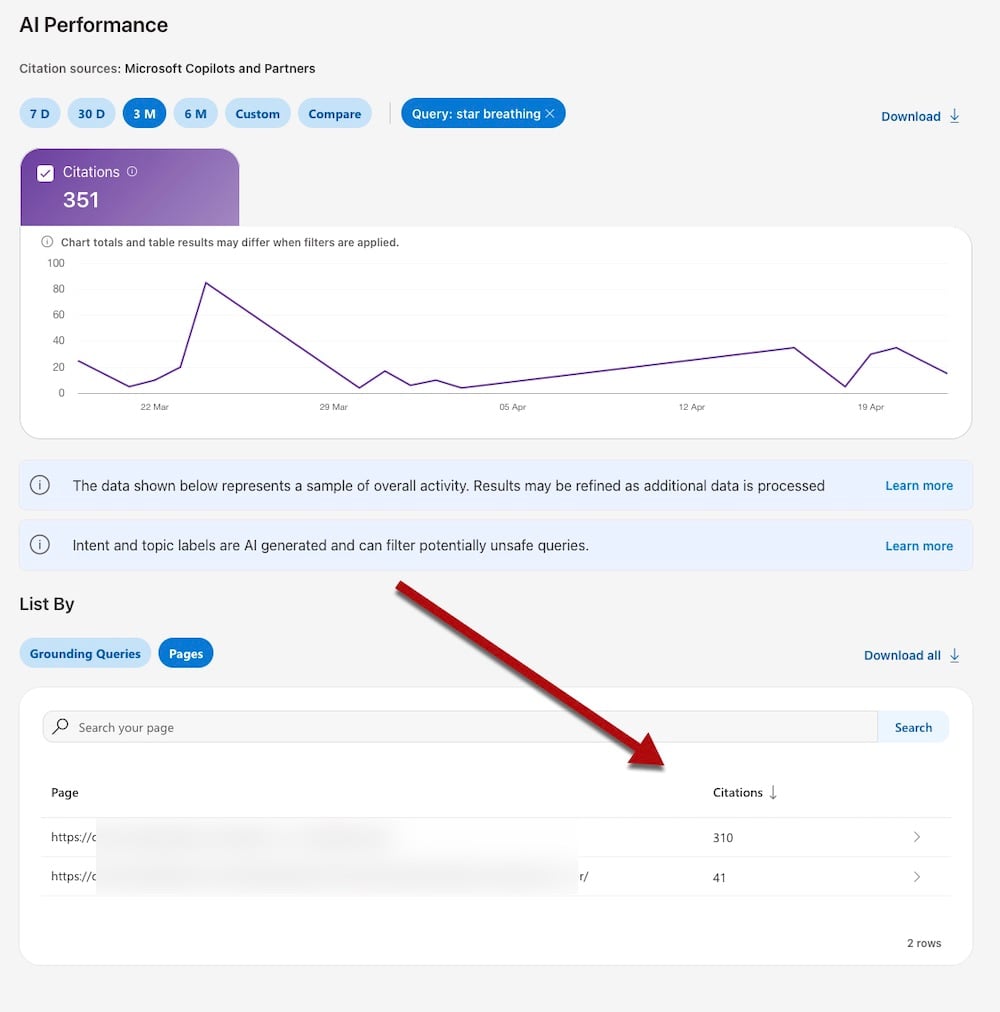
Click any page URL to reveal its total number of citations. Click image to enlarge.
Using the Data
The updated report includes expanded metrics to track visibility, such as:
- All Grounding Queries for a given page.
- Grounding Queries with fewer citations and thus opportunities for optimizing a page for inclusion.
- Branded queries with navigational intent to improve answer brand-driven questions.
- Pages with higher citation share to reverse engineer for other Grounding Queries.
- Grounding Queries by topic to identify related pages for internal linking.
- Internal pages that show for the same Grounded Queries for potential duplicate intent to fix.
- Pages with few Grounding Queries, to improve the content.
Getting Started
Setting up Bing Webmaster Tools takes only a couple of minutes with Search Console enabled.
Log in to Webmaster Tools with your Microsoft account, click “Add site,” and choose “Import your sites from GSC.” Allow roughly 24 hours for Bing to collect and report the data.
Smart shopping starts here.
If you enjoyed this article, explore our curated products designed for everyday living.
📱 Download the Dralys App
🛍️ Shop now: www.DralysStore.com