
Performance Max campaigns are a priority for Google Ads and thus for advertisers. Here are three new features for the Performance Max campaign type.
Experiments
Experiments are a great feature of the Ads platform. For example, you can run a bid strategy experiment wherein the “control” bids toward a cost-per-lead target (CPL) and the “treatment” toward return-on-ad-sales (ROAS).
The ability to run Performance Max experiments is new and very helpful. There are three types. Advertisers can test a control setting against:
- Another campaign type (Shopping, Search, or Display),
- Final URL expansion,
- Uplift of including Performance Max in other campaign types.
The first two test Performance Max campaigns against existing entities. For example, an advertiser running a Shopping campaign can test it against Performance Max via a 50/50 split — half the traffic goes to the Shopping campaign and half to Performance Max.
Testing the final URL expansion exposes half of the traffic to the optimization feature. The test determines if advertiser-selected URLs perform better than Google’s.
The final experiment type, Uplift, is the most interesting as it shows the incremental gains of using new or existing Performance Max campaigns alongside other types. The control and the treatment will each receive 50% of the traffic. The treatment includes the Performance Max and comparable campaigns. Google defines “comparable campaigns” (which are editable) as having the same domain, one or more overlapping conversion goals, or overlapping locations.
For example, if a Performance Max campaign targets winter jackets, comparable campaigns could be Search targeting jackets and Demand Gen with a winter theme.
Data Exclusions
The next update is handy for excluding traffic segments. For years Google has allowed advertisers to exclude keywords and placements, but not customer match and remarketing lists. A new feature allows advertisers to exclude audiences from seeing ads.
An option in campaign settings called “Your data exclusions” now includes customer match and remarketing audiences.
Be careful, however, as the need to exclude audiences varies by advertiser. What works for one may not apply to another, in my experience.
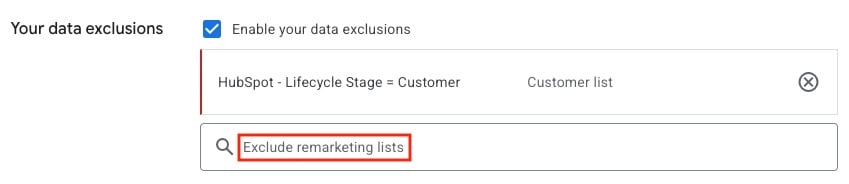
Advertisers can now exclude audiences, such as remarketing lists, from seeing ads.
Product Overlap
The final feature identifies Shopping overlap across your account. It’s not unique to Performance Max.
To start, click “Products” in the left-hand “Campaigns” section. You’ll see the complete list of your products with associated data. Clicking an individual product displays its attributes and a dropdown menu of the campaigns that include it.
Advertisers can view the results by campaign and exclude underperformers. The strategy is similar to applying negative keywords to queries to trigger the correct ads.
Smart shopping starts here.
If you enjoyed this article, explore our curated products designed for everyday living.
📱 Download the Dralys App
🛍️ Shop now: www.DralysStore.com